共计 7390 个字符,预计需要花费 19 分钟才能阅读完成。
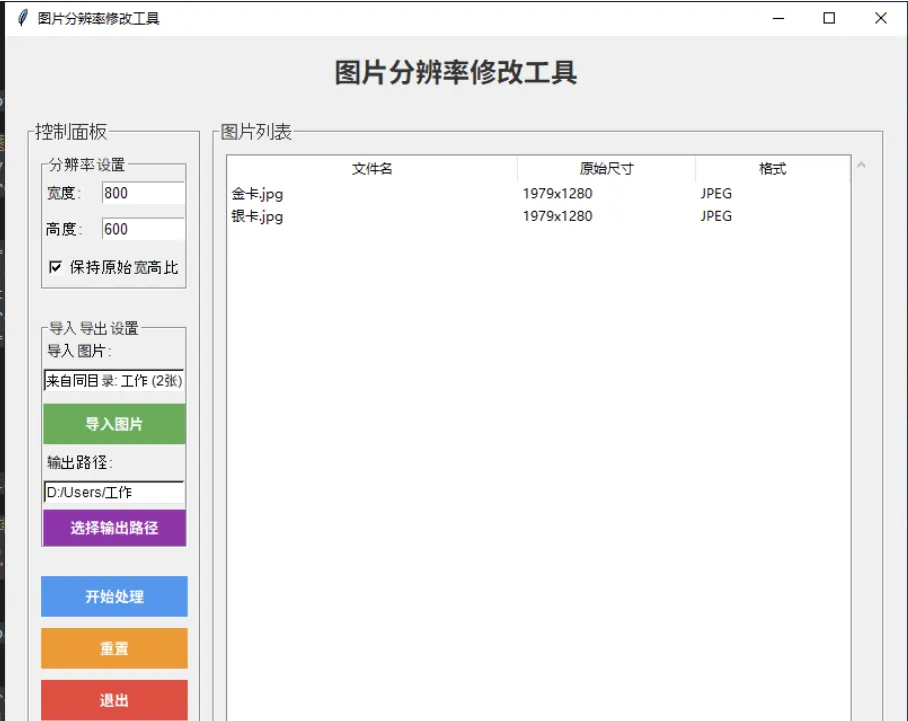
因为工作需要,要改各种尺寸的图片,用 ps 修改之后,发现与我修改的还是不太一样,于是就有了这个代码,可以写好尺寸一键修改,并且可以导入多张图片
款式就是这几样的:
import tkinter as tk
from tkinter import ttk, filedialog, messagebox
from PIL import Image
import os
class ImageResizerApp:
    def __init__(self, root):
        self.root = root
        self.root.title("图片分辨率修改工具")
        self.root.geometry("800x650")
        self.root.configure(bg="#f0f0f0")
        self.image_paths = []
        self.target_width = tk.IntVar(value=800)
        self.target_height = tk.IntVar(value=600)
        self.keep_aspect_ratio = tk.BooleanVar(value=True)
        self.output_path = ""
        self.setup_ui()
    def setup_ui(self):
        title_label = tk.Label(
            self.root,
            text="图片分辨率修改工具",
            font=("Arial", 18, "bold"),
            bg="#f0f0f0",
            fg="#333"
        )
        title_label.pack(pady=15)
        main_frame = tk.Frame(self.root, bg="#f0f0f0")
        main_frame.pack(fill=tk.BOTH, expand=True, padx=20, pady=10)
        control_frame = tk.LabelFrame(
            main_frame,
            text="控制面板",
            font=("Arial", 12),
            bg="#f0f0f0",
            fg="#333",
            padx=10,
            pady=10
        )
        control_frame.pack(side=tk.LEFT, fill=tk.Y, padx=(0, 10))
        resolution_frame = tk.LabelFrame(
            control_frame,
            text="分辨率设置",
            font=("Arial", 10),
            bg="#f0f0f0",
            fg="#333"
        )
        resolution_frame.pack(fill=tk.X, pady=(0, 15))
        width_frame = tk.Frame(resolution_frame, bg="#f0f0f0")
        width_frame.pack(fill=tk.X, pady=5)
        tk.Label(width_frame, text="宽度:", font=("Arial", 10), bg="#f0f0f0").pack(side=tk.LEFT)
        width_entry = tk.Entry(
            width_frame,
            textvariable=self.target_width,
            font=("Arial", 10),
            width=10
        )
        width_entry.pack(side=tk.RIGHT)
        height_frame = tk.Frame(resolution_frame, bg="#f0f0f0")
        height_frame.pack(fill=tk.X, pady=5)
        tk.Label(height_frame, text="高度:", font=("Arial", 10), bg="#f0f0f0").pack(side=tk.LEFT)
        height_entry = tk.Entry(
            height_frame,
            textvariable=self.target_height,
            font=("Arial", 10),
            width=10
        )
        height_entry.pack(side=tk.RIGHT)
        aspect_check = tk.Checkbutton(
            resolution_frame,
            text="保持原始宽高比",
            variable=self.keep_aspect_ratio,
            font=("Arial", 10),
            bg="#f0f0f0"
        )
        aspect_check.pack(pady=5)
        io_frame = tk.LabelFrame(
            control_frame,
            text="导入导出设置",
            font=("Arial", 10),
            bg="#f0f0f0",
            fg="#333"
        )
        io_frame.pack(fill=tk.X, pady=10)

        tk.Label(io_frame, text="导入图片:", font=("Arial", 10), bg="#f0f0f0").pack(anchor=tk.W, pady=(0, 5))
        self.import_path_var = tk.StringVar(value="未选择")
        import_path_label = tk.Label(
            io_frame,
            textvariable=self.import_path_var,
            font=("Arial", 9),
            bg="#ffffff",
            relief=tk.SUNKEN,
            anchor=tk.W
        )
        import_path_label.pack(fill=tk.X, pady=(0, 5))

        import_btn = tk.Button(
            io_frame,
            text="导入图片",
            command=self.import_images,
            bg="#4CAF50",
            fg="white",
            font=("Arial", 10, "bold"),
            relief=tk.FLAT,
            padx=10,
            pady=5
        )
        import_btn.pack(fill=tk.X, pady=5)
        tk.Label(io_frame, text="输出路径:", font=("Arial", 10), bg="#f0f0f0").pack(anchor=tk.W, pady=(0, 5))
        self.output_path_var = tk.StringVar(value="未选择")
        output_path_label = tk.Label(
            io_frame,
            textvariable=self.output_path_var,
            font=("Arial", 9),
            bg="#ffffff",
            relief=tk.SUNKEN,
            anchor=tk.W
        )
        output_path_label.pack(fill=tk.X, pady=(0, 5))

        select_output_btn = tk.Button(
            io_frame,
            text="选择输出路径",
            command=self.select_output_path,
            bg="#9C27B0",
            fg="white",
            font=("Arial", 10, "bold"),
            relief=tk.FLAT,
            padx=10,
            pady=3
        )
        select_output_btn.pack(fill=tk.X)
        button_frame = tk.Frame(control_frame, bg="#f0f0f0")
        button_frame.pack(fill=tk.X, pady=10)
        start_btn = tk.Button(
            button_frame,
            text="开始处理",
            command=self.start_processing,
            bg="#2196F3",
            fg="white",
            font=("Arial", 10, "bold"),
            relief=tk.FLAT,
            padx=10,
            pady=5
        )
        start_btn.pack(fill=tk.X, pady=5)
        reset_btn = tk.Button(
            button_frame,
            text="重置",
            command=self.reset,
            bg="#FF9800",
            fg="white",
            font=("Arial", 10, "bold"),
            relief=tk.FLAT,
            padx=10,
            pady=5
        )
        reset_btn.pack(fill=tk.X, pady=5)
        exit_btn = tk.Button(
            button_frame,
            text="退出",
            command=self.root.quit,
            bg="#f44336",
            fg="white",
            font=("Arial", 10, "bold"),
            relief=tk.FLAT,
            padx=10,
            pady=5
        )
        exit_btn.pack(fill=tk.X, pady=5)
        list_frame = tk.LabelFrame(
            main_frame,
            text="图片列表",
            font=("Arial", 12),
            bg="#f0f0f0",
            fg="#333",
            padx=10,
            pady=10
        )
        list_frame.pack(side=tk.RIGHT, fill=tk.BOTH, expand=True)
        columns = ('filename', 'original_size', 'format')
        self.tree = ttk.Treeview(list_frame, columns=columns, show='headings', height=5)
        self.tree.heading('filename', text='文件名')
        self.tree.heading('original_size', text='原始尺寸')
        self.tree.heading('format', text='格式')
        self.tree.column('filename', width=200)
        self.tree.column('original_size', width=100)
        self.tree.column('format', width=80)
        scrollbar = ttk.Scrollbar(list_frame, orient=tk.VERTICAL, command=self.tree.yview)
        self.tree.configure(yscrollcommand=scrollbar.set)

        self.tree.pack(side=tk.LEFT, fill=tk.BOTH, expand=True)
        scrollbar.pack(side=tk.RIGHT, fill=tk.Y)

    def import_images(self):
        supported_formats = [("All Supported Images", "*.jpg;*.jpeg;*.png;*.bmp;*.gif;*.tiff;*.webp;*.ico"),
            ("JPEG", "*.jpg;*.jpeg"),
            ("PNG", "*.png"),
            ("BMP", "*.bmp"),
            ("GIF", "*.gif"),
            ("TIFF", "*.tiff"),
            ("WEBP", "*.webp"),
            ("All Files", "*.*")
        ]

        filenames = filedialog.askopenfilenames(
            title="选择图片文件",
            filetypes=supported_formats
        )

        if filenames:
            for filename in filenames:
                if filename not in self.image_paths:
                    self.image_paths.append(filename)
            if len(filenames) > 1:
                directories = set(os.path.dirname(path) for path in filenames)
                if len(directories) == 1:
                    common_dir = list(directories)[0]
                    display_text = f"来自同目录: {os.path.basename(common_dir)} ({len(filenames)} 张 )"
                else:
                    display_text = f"多目录导入 ({len(filenames)} 张 )"
                self.import_path_var.set(display_text)
            elif len(filenames) == 1:
                self.import_path_var.set(os.path.dirname(filenames[0]))
            else:
                self.import_path_var.set("未选择")

            self.refresh_image_list()
    def refresh_image_list(self):
        for item in self.tree.get_children():
            self.tree.delete(item)

        for path in self.image_paths:
            try:
                img = Image.open(path)
                size_str = f"{img.width}x{img.height}"
                format_str = img.format or "Unknown"
                filename = os.path.basename(path)

                self.tree.insert('', tk.END, values=(filename, size_str, format_str))
            except Exception as e:
                print(f"无法读取图片 {path}: {e}")
    def start_processing(self):
        if not self.image_paths:
            messagebox.showwarning("警告", "请先导入图片!")
            return

        if not self.output_path:
            self.output_path = filedialog.askdirectory(title="选择输出目录")
            if not self.output_path:
                return
            self.output_path_var.set(self.output_path)

        target_w = self.target_width.get()
        target_h = self.target_height.get()

        if target_w <= 0 or target_h <= 0: messagebox.showerror("错误", "请输入有效的分辨率值!") return success_count = 0 error_count = 0 for img_path in self.image_paths: try: with Image.open(img_path) as img: original_size = img.size if self.keep_aspect_ratio.get(): original_ratio = original_size[0] / original_size[1] target_ratio = target_w / target_h if original_ratio > target_ratio:
                            new_width = target_w
                            new_height = int(target_w / original_ratio)
                        else:
                            new_height = target_h
                            new_width = int(target_h * original_ratio)

                        resized_img = img.resize((new_width, new_height), Image.Resampling.LANCZOS)
                    else:
                        resized_img = img.resize((target_w, target_h), Image.Resampling.LANCZOS)

                    base_name = os.path.splitext(os.path.basename(img_path))[0]
                    extension = os.path.splitext(img_path)[1]
                    output_path = os.path.join(self.output_path, f"{base_name}{extension}")

                    counter = 1
                    original_output_path = output_path
                    while os.path.exists(output_path):
                        name_part = os.path.splitext(original_output_path)[0]
                        ext_part = os.path.splitext(original_output_path)[1]
                        output_path = f"{name_part}_resized_{counter}{ext_part}"
                        counter += 1

                    resized_img.save(output_path, optimize=True, quality=95)
                    success_count += 1

            except Exception as e:
                print(f"处理图片失败 {img_path}: {e}")
                error_count += 1

        messagebox.showinfo(
            "处理完成",
            f"成功处理 {success_count} 张图片 \n{error_count} 张图片处理失败"
        )
    def reset(self):
        self.image_paths.clear()
        self.target_width.set(800)
        self.target_height.set(600)
        self.keep_aspect_ratio.set(True)
        self.output_path = ""self.output_path_var.set(" 未选择 ")
        self.refresh_image_list()

    def select_output_path(self):
        """选择输出路径"""
        selected_path = filedialog.askdirectory(title="选择输出目录")
        if selected_path:
            self.output_path = selected_path
            self.output_path_var.set(selected_path)
if __name__ == "__main__":
    root = tk.Tk()
    app = ImageResizerApp(root)
    root.mainloop()
正文完